関連ソフトウェア
EaseUS Partition Master Free
Partition Magicの代替として、EASEUS Partition Master Home Editionは無料のオールインワンパーティションソリューションおよびディスク管理ユーティリティです。パーティションの拡張(特にシステムドライブ用)、ディスク領域の管理、MBRおよびGUIDパーティションテーブル(GPT)ディスクのディスク領域不足の問題の解決を可能にします。 パーティションのサイズ変更/移動システムドライブを拡張するディスクとパーティションをコピーパーティションをマージ分割パーティション空き領域を再分配するダイナミックディスクの変換パーティションを回復する
Dolmen
ドルメン:ユニークなラヴクラフトの冒険
Greedshot
Greedshotにおける生存と裏切り
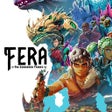
Fera: The Sundered Tribes
魅力的な部族管理とサバイバルゲーム
Mind The Dragon
ドラゴンを心に持つダイナミックな戦略ゲームプレイ
Oddsparks: An Automation Adventure
Odsparksの冒険における自動化を探求する

Obfuscar
Obfuscar is an obfuscation tool for .NET assemblies that has been released under MIT license. This solid tool provides basic obfuscation features that help secure secrets in a .NET assembly. In order to rename metadata in .NET assemblies Obfuscar uses massive overloading to a minimal set, and this is distinguishable in the majority of cases only by signature. It includes the names of methods, properties, events, fields, types and namespaces. For instance, if a class contains only methods, which accept different parameters then they can all be renamed 'A'. If another method is added to the class that accepts the same parameters as an existing method, it could be named 'a'. Overall, Obfuscar is a great tool that makes decompiled code very laborious to follow.
Tux Paint
Tux Paint is a free, award-winning drawing application aimed at children ages 3 to 12 (preschool and K-6). Tux Paint is used in schools around the world as a computer literacy drawing activity. It has an easy-to-use interface that is combined with fun sound effects, and an encouraging cartoon mascot called Tux, who appears at the bottom of the screen to give tips, hints and information to guide children as they use the application. To begin, children are presented with a blank canvas and a variety of tools to help them be creative. The drawing tools are made available on the drawing canvas and are easily accessible. The canvas is a fixed size, so there is no need to worry about 'pixels' or 'inches' when making a new picture. The entire program fits on a screen as small as 640x480, and can be displayed full-screen, to mask the computer's underlying 'desktop' interface. (It defaults to 800x600 mode, but can run at larger sizes and in portrait or landscape mode, as well.) To load and save images a simple thumbnail display is used, so no knowledge of the file system structure is required. Even file names are unnecessary. The interface is both entertaining and useful for children to use. It is also configurable and sound effects, print, and quit options can be disabled. Tux Paint has massive multi-language support, with parts of Tux Paint translated into 129 languages Overall, Tux Paint is a great tool that allows pre-school children onward, the ability to explore their creativity. It has a simple interface that young minds can easily grasp and there are numerous different drawing tools available; from brushes and stamps to alternate colour palettes. Text can be input in various different fonts and there is also an effects tool to tinker around with too.
Audacity
Audacity is a free, easy-to-use audio editor and recorder for Windows, Mac OS X, GNU/Linux and other operating systems. You can use Audacity to: Record live audio. Convert tapes and records into digital recordings or CDs. Edit Ogg Vorbis, MP3, WAV or AIFF sound files. Cut, copy, splice or mix sounds together. Change the speed or pitch of a recording. Add new effects with LADSPA plug-ins. And more!
Rufus
Rufusは小さなユーティリティで、USBキーやペンドライブ、メモリスティックなどの起動可能なUSBフラッシュドライブをフォーマットおよび作成できます。 Rufusは、次のシナリオで役立ちます。 Windows、Linux、およびUEFI用の起動可能なISOからUSBインストールメディアを作成する必要がある場合。 OSがインストールされていないシステムで作業する必要がある場合。 BIOSまたはその他のファームウェアをDOSからフラッシュする必要がある場合。 低レベルのユーティリティを実行する必要がある場合。 Rufusは次の* ISOで動作します:Arch Linux、Archbang、BartPE / pebuilder、CentOS、Damn Small Linux、Fedora、FreeDOS、Gentoo、gNewSense、Hiren's Boot CD、LiveXP、Knoppix、Kubuntu、Linux Mint、NT Password Registry Editor、 OpenSUSE、Parted Magic、Slackware、Tails、Trinity Rescue Kit、Ubuntu、Ultimate Boot CD、Windows XP(SP2以降)、Windows Server 2003 R2、Windows Vista、Windows 7、Windows 8。 *このリストは完全ではありません。 サポートされている言語は次のとおりです。インドネシア語、マレーシア語、セシュティナ、ダンスク、ドイツ語、英語、スペイン語、フランス語、フルバツキー、イタリア語、ラトヴィエシュ、リエトゥビウ、マジャール、オランダ、ノルスク、ポルスキ、ポルトガル、ポルトガル、スロヴェンスキー、スロベンツキー、スロヴェンスキーSrpski、Suomi、Svenska、Türkçe。
CyberLink PowerDVD
PowerDVD18は、DVDおよびBlu-rayディスク以上のものを再生します。 ビデオ、オーディオ、写真、VR 360°コンテンツ、さらにはYouTubeやVimeoにとっても、PowerDVD18は重要なエンターテイメントの仲間です。 Ultra HD HDR TVとサラウンドサウンドシステムの可能性を解き放ち、360°ビデオの増え続けるコレクションへのアクセスで仮想世界に没頭するか、PCまたはラップトップでの比類のない再生サポートと独自の強化により、どこにいても簡単にリラックスできます。 新機能は次のとおりです。 4K DHR向けに最適化 Ultra HD Blu-ray、4K、HEVC / H.265およびHDR10コンテンツをサポート全画面モードで21:9モニターで2.35:1の映画を見る常時オンのミニビューでYouTubeライブを見る YouTubeおよびVimeoで4K HDRおよび360ビデオを再生 VRエクスペリエンスの向上:Microsoft Mixed Realityヘッドセット、HTC、VIVE、およびOculus Riftをサポート Fire TVとキャストのサポート注:これは商用トライアルです。
PCSX2
PCSX2は、PC用のPlaystation 2エミュレーターです。エミュレータの互換性率は、プレイ可能なすべてのPS2ゲームの80%以上を誇っています。かなり強力なコンピューターを所有している場合、PCSX2は優れたエミュレーターです。また、このアプリケーションはローエンドコンピューターのサポートも提供するため、Playstation 2コンソールのすべての所有者は、PCで動作するゲームを見ることができます。 PCSX2エミュレーターを使用すると、PS2コントローラーを使用して、本物のプレイステーション体験をシミュレートできます。このアプリケーションでは、ディスクからゲームを直接実行することも、ハードドライブからISOイメージとして実行することもできます。 主な機能は次のとおりです。 Savestates:ボタンを1つ押すだけで、ゲームの現在の「状態」を保存できます。 無制限のメモリーカード:好きなだけメモリーカードを保存でき、8MBから64MBまでの単一の物理カードに制限されなくなりました。 高解像度グラフィックス:PCSX2を使用すると、1080pまたは4K HDでゲームをプレイできます。 全体として、PCSX2 PS2エミュレーターの機能は優れています。 PS2ゲームを高い精度でエミュレートでき、Windowsとエミュレーターを切り替えることができます。欠点は、高速ゲームに苦労し、時々フリーズまたはクラッシュすることです。* PCSX2を使用するには、コンソールから抽出できるPlaystation 2 BIOSが必要です。