
Windows用の無料プログラム。
Windows用のOpen IT Onlineについて
このソフトウェアは2025年3月13日にFilehippoで公開され、まだテストする機会がありません。
ぜひお試しいただき、コメントを残すか、当社のウェブサイトで評価してください。私たちのユーザーコミュニティは本当に感謝します!
Open IT OnlineはWindows 98以降で動作します。プログラムの現在のバージョンは2.5で、英語のみで入手できます。
編集者レビュー · 2025年3月13日
このソフトウェアは2025年3月13日にFilehippoで公開され、まだテストする機会がありません。
ぜひお試しいただき、コメントを残すか、当社のウェブサイトで評価してください。私たちのユーザーコミュニティは本当に感謝します!
Open IT OnlineはWindows 98以降で動作します。プログラムの現在のバージョンは2.5で、英語のみで入手できます。
8466e45b6408155a6f973da681d1f6982a0ed298
Open IT Onlineのバージョン2.5に関する変更ログ情報はまだありません。出版社がこの情報を公開するのに時間がかかる場合がありますので、数日後にもう一度チェックして更新されたかどうかを確認した後、
変更ログ情報に変更があった場合には、お客様からの連絡をお待ちしております!次に進みます。お問い合わせページ 当社にご連絡ください。

If you are in the market for a free, Open Source audio conversion app, and you don’t mind a working with a simple interface, then you can’t go far wrong with Freac. Beneath the standard, bare bones window lies powerful open source conversion encoders that are able to rapidly convert your audio files to a good selection of formats. Not only can Freac convert an array of audio files, but it can also rip audio CDs as well. The app can access the online CDDB database to automatically populate the metadata attached to your media files, so they can be organized correctly in your media library. This is really useful as it saves a stack of time in manually adding the data yourself. Freac also comes with a couple of neat tools and configurable features, such as a built-in media player, with standard functionality; play, pause, stop, and skip next or skip previous. When saving content, you can choose a default saving directory, select the encoder you need, apply some audio filters, such as High-pass or Low-pass, create various playlists and cue sheets, install plugins, and you can edit ID3 tags as well. You can even batch process files, if you need to. Overall, Freac supports a wide array of formats, including .MP3, .Bonk, .WMA, .MP4/M4A, .AAC, .Ogg .Vorbis, .FLAC, and .WAV. It has a good selection of configurable options, and it is available in over 36 languages.

Corel Office is a simple and sleek, Microsoft compatible office suite, which comes loaded with three individual applications: Corel Write, Corel Calculate and CorelShow. Corel Office gives you a complete office suite that has a familiar look and feel to it. The application also comes with built-in PDF creation tools that allow you to save your files in PDF format. KEY FEATURES INCLUDE: Easy to learn and use. With a familiar ribbon-style interface, Corel Office appears like the office software you're used to, thereby making it easy to start work immediately. Microsoft compatibility. With Corel Office you can open, edit, create and save Microsoft Office documents with just one click! One-click online sharing. Corel Office allows you to share your work easily thanks to support for Dropbox, the file-sharing service, which lets you securely post files online. System requirements: Microsoft Windows 8, Microsoft Windows 7, Windows Vista or Windows XP (32-bit and 64-bit editions). 256 MB RAM. 1 GHz processor. 152 MB hard disk space for English; 165 MB for English and French. 1024 x 600 screen resolution.
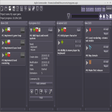
Agile Commander is a simple, offline workflow tool specifically designed for independent programmers and small teams. Also known as a Kanban board, it is essentially a workflow visualisation tool used to increase productivity and optimize the flow of your work. Unlike similar workflow tools, Agile Commander isn't online, it is a native application installed on your laptop or desktop. Because it is all stored on your own device, you keep full control of your data. Agile Commander is compatible with Windows and Linux. Key features include: Visualise and optimize your workflow. Track tasks and log changes. Simple desktop application. Limit the number of projects to be worked on at once. Work offline. Link tasks to hard drive files. Compatible with Windows and Linux. It is easy to customise Agile Commander to work for you, with multiple optional features to improve your workflow. You can add checklists and extra descriptions to more complex tasks, without cluttering your Kanban board thanks to a handy 'fold' feature to streamline tasks. You can also link a task with a specific file on your hard drive, that will open with just one click. Agile Commander even allows you to identify cards by an ID, filter cards to find exactly what you're looking for, and easily restore completed or trashed cards. Because Agile Commander works offline, you can install the application on your laptop and take it with you wherever you are and access your tasks even without an internet connection. It is easy to migrate to a new laptop or desktop, simply install the application on your chosen device and copy the project file to bring all your tasks with you. You can also track changes to projects using Agile Commander thanks to its handy activity log. Overall, Agile Commander is a simple offline workflow tool to visualise and optimise your tasks and work processes. It includes features specifically designed for independent programmers, including the ability to link a task directly to a file on your hard drive. If you're looking for a simple tool to keep track of your work and easily log tasks, why not try Agile Commander for yourself today. Do you work with a larger team? Check out the full range of business project management and collaboration apps on FileHippo.

Surf Anonymously Free is a useful app that replaces your Internet connection's standard IP address with an anonymous one, which changes regularly, thereby hiding your identity from threats such as hackers and identity thieves. Surf Anonymous Free has a simple user interface that is small enough to keep open on your desktop. The app displays national flags and IP addresses for two locations* that are large enough to be seen at a glance. These two IP addresses consist of your real IP address, including your city and country, and a fake Surf Anonymous Free IP address that is showed online. Surf Anonymous Free is a handy little app that provides a measure of anonymity by hiding your IP address, thereby protecting you from any vulnerabilities that are associated with it. * Surf Anonymous Free is free but is limited to U.S.only IP addresses. To use Surf Anonymous Free from a non-U.S. IP address or to disguise a U.S. address as a foreign IP, a Pro version is available.

Animiz is a great app for creating animated video media. Animiz is a simple yet powerful video presentation creation app that can be used to make engaging animated videos for free. With Animiz no coding or experience is required. Animiz can be used to create animated video presentation, product video demos, and business video presentations. Making stunning animated videos is just easy with Animiz. Key Features include: Rich online video templates: Animiz provides well-made templates that cover almost all the topics, such as Business, Education, Festival, Food, and Technology. Simply download and edit the template and add your flair. Cool camera effects: In animated videos, visual aspects are key. Animated video with eye-catching effects get straight to your points quickly. Diverse video assets: Interactive videoas help you engage with your audience better. Animiz has an element toolbar that allows you to add shape, image, text, role, effect, callout, SVG, sound, video, SWF, symbol, actor, chart, formula, and label to your videos. Powerful multi-track timeline: Customization is easy with Animiz. You can customize camera, background, caption, and animation. Flexible output options:Animiz provides you with three options to publish your project.Publish it to the cloud, publish it offline in 6 different formats (.mp4, .mov, .wmv, .avi, .flv, .mkv) based on your requirements, and you can save it as GIF format. Overall, Animiz is a powerful set of tools that can help you save a considerable amount of time and effort for in creating animated videos. the interface is easy to use and looks well designed, and the learning curve is fairly shallow considering all the tools that can be used.

CryptBox is a very useful security utility that creates secure safes, which are handled like normal drives and which you are able to store your data in, in an encrypted, secure environment that can only be accessed by you. CryptBox can encrypt your data with the AES-256 algorithm, which is the standard for secure banking and online monetary transactions. Using CryptBox is easy. The app provides a few nice walk through wizards for the main tasks, which help you step by step to your own safe. CryptBox also has a number of useful tools, for example you can transform existing folders and convert them into safe folders. A great feature of CryptBox is that it accepts different types of passwords for your safe. You can almost anything to secure you data in your safes. For example, you could use a USB device, an alphanumeric password or a series of images to open your safes. CryptBox also allows you to create a TravelSafe, which can be exported to an USB-Stick or on a CD. If you are on the road, e.g. for visiting friends, surfing in an InternetCafe or at working at another PC, you still have full access to your data, because the TravelSafe can be started directly from a USB stick. Overall, CryptBox is a simple, yet secure method of ensuring your data remain under lock and key. With various options to create passwords and the ability to store safes on usb drives and optical media, you can see why CryptBox is something that should check out.

Partition Magicの代替として、EASEUS Partition Master Home Editionは無料のオールインワンパーティションソリューションおよびディスク管理ユーティリティです。パーティションの拡張(特にシステムドライブ用)、ディスク領域の管理、MBRおよびGUIDパーティションテーブル(GPT)ディスクのディスク領域不足の問題の解決を可能にします。 パーティションのサイズ変更/移動システムドライブを拡張するディスクとパーティションをコピーパーティションをマージ分割パーティション空き領域を再分配するダイナミックディスクの変換パーティションを回復する

Rufusは小さなユーティリティで、USBキーやペンドライブ、メモリスティックなどの起動可能なUSBフラッシュドライブをフォーマットおよび作成できます。 Rufusは、次のシナリオで役立ちます。 Windows、Linux、およびUEFI用の起動可能なISOからUSBインストールメディアを作成する必要がある場合。 OSがインストールされていないシステムで作業する必要がある場合。 BIOSまたはその他のファームウェアをDOSからフラッシュする必要がある場合。 低レベルのユーティリティを実行する必要がある場合。 Rufusは次の* ISOで動作します:Arch Linux、Archbang、BartPE / pebuilder、CentOS、Damn Small Linux、Fedora、FreeDOS、Gentoo、gNewSense、Hiren's Boot CD、LiveXP、Knoppix、Kubuntu、Linux Mint、NT Password Registry Editor、 OpenSUSE、Parted Magic、Slackware、Tails、Trinity Rescue Kit、Ubuntu、Ultimate Boot CD、Windows XP(SP2以降)、Windows Server 2003 R2、Windows Vista、Windows 7、Windows 8。 *このリストは完全ではありません。 サポートされている言語は次のとおりです。インドネシア語、マレーシア語、セシュティナ、ダンスク、ドイツ語、英語、スペイン語、フランス語、フルバツキー、イタリア語、ラトヴィエシュ、リエトゥビウ、マジャール、オランダ、ノルスク、ポルスキ、ポルトガル、ポルトガル、スロヴェンスキー、スロベンツキー、スロヴェンスキーSrpski、Suomi、Svenska、Türkçe。

PCSX2は、PC用のPlaystation 2エミュレーターです。エミュレータの互換性率は、プレイ可能なすべてのPS2ゲームの80%以上を誇っています。かなり強力なコンピューターを所有している場合、PCSX2は優れたエミュレーターです。また、このアプリケーションはローエンドコンピューターのサポートも提供するため、Playstation 2コンソールのすべての所有者は、PCで動作するゲームを見ることができます。 PCSX2エミュレーターを使用すると、PS2コントローラーを使用して、本物のプレイステーション体験をシミュレートできます。このアプリケーションでは、ディスクからゲームを直接実行することも、ハードドライブからISOイメージとして実行することもできます。 主な機能は次のとおりです。 Savestates:ボタンを1つ押すだけで、ゲームの現在の「状態」を保存できます。 無制限のメモリーカード:好きなだけメモリーカードを保存でき、8MBから64MBまでの単一の物理カードに制限されなくなりました。 高解像度グラフィックス:PCSX2を使用すると、1080pまたは4K HDでゲームをプレイできます。 全体として、PCSX2 PS2エミュレーターの機能は優れています。 PS2ゲームを高い精度でエミュレートでき、Windowsとエミュレーターを切り替えることができます。欠点は、高速ゲームに苦労し、時々フリーズまたはクラッシュすることです。* PCSX2を使用するには、コンソールから抽出できるPlaystation 2 BIOSが必要です。

Googleのトップ無料ブラウザ

仮想マシンは、ソフトウェアで定義されたコンピューターです。 PCでPCを実行するようなものです。 この無料のデスクトップ仮想化ソフトウェアアプリケーションにより、VMware Workstation、VMware Fusion、VMware Server、またはVMware ESXで作成された仮想マシンを簡単に操作できます。 主な機能は次のとおりです。 1台のPCで複数のオペレーティングシステムを同時に実行します。 インストールや構成の問題なしに、事前構成された製品の利点を体験してください。 ホストコンピューターと仮想マシン間でデータを共有します。 32ビットと64ビットの両方の仮想マシンを実行します。 2-way Virtual SMPを活用します。 サードパーティの仮想マシンとイメージを使用します。 ホストコンピューターと仮想マシン間でデータを共有します。 幅広いホストおよびゲストオペレーティングシステムのサポート。 USB 2.0デバイスのサポート。 起動時にアプライアンス情報を取得します。 直感的なホームページインターフェイスを介して仮想マシンに簡単にアクセスできます。 VMware Playerは、Microsoft Virtual Server仮想マシンまたはMicrosoft Virtual PC仮想マシンもサポートしています。

BlueStacks App PlayerはPCまたはMacを使用して、お気に入りの携帯アプリ/ゲームをブラウザのフルスクリーンで実行することができる素晴らしいツールです。 BlueStacks App Playerの主要な特徴 完全にカスタマイズ可能な環境 複数のOSに対応 構成 Google Playとの統合 BlueStacks App Player は一度インストールされると、お好みの有名なソーシャル・メディア・プラットホーム、例えばFacebook またはTwitterと一緒に連携するように構成できます。この環境はAndroid アプリを実行するので、BlueStacks App PlayerをGoogle Playアカウントと連携して構成することができます。そうして全てのお気に入りのアプリとゲームにアクセスすることができるのです! BlueStacks App Playerのユーザーインターフェースは完全にあなたの好みに合わせて構成することができます。加えて、PC メーカーによって開発・設計されたカスタムソフトウエアエクスペリエンスにも統合することができます。 BlueStacks App Playerは複数言語をサポートしています。 BlueStacks App Playerを通して完全な Android環境を楽しむことができます。またもしお好みの場合は、Android アプリのアイコンをWindowsのデスクトップ上に直接インストールすることもできます。

Joomla! - ウェブ開発のための多用途ツール
CPU-Z ポータブル:システムの主要なデバイスに関する情報を取得します。
EasyUEFI を焼き付けて数分でコンピュータを起動する

AI駆動のビデオ強化:AVCLabs Video Enhancer AIレビュー

Opentrack - 無料でコンピューターを記録する

WinLinkerによる簡単なリンク作成

EVEMonでEVE Onlineのスキルを管理する

包括的なオフライン医療百科事典

Cava: Windows用のダイナミックオーディオビジュアライザー

ダイナミックオンラインコラボレーティブホワイトボードツール

挑戦的な水中冒険に飛び込もう

Quicker: 多用途の生産性ツール