Start Menu 8 Windows向けのアプリ
- IObit による
- 無料
- 4.0-beta

技術仕様
- タイトル
- Windows用のStart Menu 8 4.0-beta
- 必要条件
- Windows 8.1
- Windows 7
- Windows 8
- Windows 10
- Windows XP
- Windows Vista
- 言語
- 日本語
- 利用可能な言語
- ドイツ語
- 英語
- スペイン語
- フランス語
- イタリア語
- 日本語
- ポーランド語
- 中国語
- ライセンス
- 無料
- 最新の更新
- 著者
- IObit
- SHA-1
25802489f1e113e858bb7b07b8a431e80dd59be0
- ファイル名
- sm8-setup.exe
他の言語で利用可能なプログラム
Start Menu 8 Windows向けのアプリ
- IObit による
- 無料
- 4.0-beta
変更ログ
Start Menu 8のバージョン4.0 Betaに関する変更ログ情報はまだありません。出版社がこの情報を公開するのに時間がかかる場合がありますので、数日後にもう一度チェックして更新されたかどうかを確認した後、
アンケートにお答えいただけますか?
変更ログ情報に変更があった場合には、お客様からの連絡をお待ちしております!次に進みます。お問い合わせページ 当社にご連絡ください。
アプリを探索











関連ソフトウェア
Windows 8 Start Menu Toggle
効率的なスタートメニューカスタマイズツール

NTLite Free 32-bit
NTLite Free 32-bit is an app for Windows administrators that allows you to edit Windows installation images, either 'offline' or 'live'. The 'live' edit mode is a unique feature that lets you modify already installed Windows OS' without re-installation. All you have to do is run the tool on the OS you want to edit, change what you need and reboot if necessary. NTLite Free 32-bit has an intuitive interface which is easy to use. The app makes use of dynamic menus, an easy image mount overview and single- file settings. Key Features Include: Intuitive interface. Disk partitioning. Highly customizable. 'Live' edit mode. The app has numerous features including component removal, language packs and app integration, disk partitioning and a pending changes overview. It is interesting to note that NTLite does not require .NET Framework to run under supported operating systems. This is useful as it enables the app to run faster and is more portable with less dependencies. Supported Windows versions include Windows 7, 8, 8.1 and 10 Technical Preview.
Notepad3
Notepad3 is a revamp of the standard, vanilla offering Windows Notepad that comes with Microsoft’s operating system. Notepad3 is a fast and lightweight Scintilla-based text editor with syntax highlighting capability. Although it has a small footprint, it is powerful enough to handle most programming jobs thrown at it. Key Features include: Code folding. Bracket matching. Automatic indentation. Word auto-completion. Convert character encoding between various formats (ASCII, UTF-8, and UTF-16). Newline format conversion (between DOS (CR/LF). Unix (LF), and Macintosh (CR) formats), multiple undo or redo, bookmarks, and regular expression-based find and replace. Notepad3 also supports many programming languages including syntax highlighting support for ASP, assembly language, AutoHotkey, AutoIt3, AviSynth, Bash, BAT, C, C++, C#, CMake, CoffeeScript, Common Gateway Interface (CGI), Cascading Style Sheets (CSS), DIFF, HTML, INF, INI, Inno Setup, Java, JavaScript, LaTeX, Lua, Markdown, NSIS, Pascal, Perl, PHP, Python, REG, Ruby, SQL, Tcl, Visual Basic (VB), VBScript, VHDL scripts, XHTML, XML, YAML and improved support for NFO ANSI art.
Pokki Start Menu
PokkiでWindows 8の体験を再活性化する

Lines Code Editor
Lines Code Editor was created to be a free, fast and simple source code editor for Microsoft Windows. Seen by its creators at CreatixBih as a great Notepad replacement editor, the software boasts many features and is pretty easy to use. Users will notice a quick and effective start-up and workflow, even on older machines. It also has an integrated web browser with auto-refresh on save and a host of easy to navigate document tabs. Key features include: Checks PHP syntax errors on save. Custom text snippets and document templates. Split code editor up to four views. User commands, external scripts, output console. Full capable project explorer integration. Syntax highlighting for many common languages. Code folding for CSS, PHP and JavaScript files. The software also supports Unicode, UTF-8, ANSI, ASCII encodings, and boasts an encoding converter. It contains a work-space and project-based file browser which facilitates code export and printing support. There is also a colour picker with the current CSS file colours. In terms of line operations you can toggle comment, duplicate, remove empty and trim ends. You are also able to convert encoding and text by opening the folder as a project from explorer’s right click menu. You will then have right click editing of any file in explorer and be able to export the project as a zip file. Lines Code Editor has many more abilities, but overall it is quickly gaining a great reputation as a Notepad replacement editor. It is also remarkably user friendly, which makes all the difference. It is available for download, as long as the following requirements are met: Microsoft .NET Framework 3.5 – Download and Windows: XP, Vista, 7, 8 or 10
EaseUS Partition Master Free
Partition Magicの代替として、EASEUS Partition Master Home Editionは無料のオールインワンパーティションソリューションおよびディスク管理ユーティリティです。パーティションの拡張(特にシステムドライブ用)、ディスク領域の管理、MBRおよびGUIDパーティションテーブル(GPT)ディスクのディスク領域不足の問題の解決を可能にします。 パーティションのサイズ変更/移動システムドライブを拡張するディスクとパーティションをコピーパーティションをマージ分割パーティション空き領域を再分配するダイナミックディスクの変換パーティションを回復する
3uTools
3uToolsは、すべてのiOSデバイスで動作するように設計されたオールインワンWindowsベースのアプリケーションです。 3uToolsは、現在利用可能な最も効率的なiOSファイルおよびデータ管理ツールであると主張しています。この声明の信on性についてコメントすることはできませんが、アプリ、写真、音楽、着信音、その他のマルチメディアファイルを簡単に管理できます。 また、ジェイルブレイク、アクティベーション、バッテリー、iCloudロックのステータスなど、iOSデバイスのさまざまなステータスを表示することもできます。 3uToolsは、詳細なiOSおよびiDevice情報も提供します。 3uToolsには、アイコン管理、ガベージクリーナー、データ移行、データバックアップ、着信音メーカー、ビデオコンバーター、無効なアイコンの削除など、iOSデバイスのユーザー向けのさまざまな機能のコレクションが付属しています。 3uToolsには、iOSデバイスで使用可能なファームウェアを自動的に一致させる便利な機能もあり、通常モード、DFU、および復旧モードでiOSフラッシュをサポートしています。 3uToolsには、無料でダウンロードしてインストールできる着信音や壁紙などのさまざまなアプリケーションを見つけるオンラインストアもあります。 将来のダウンローダーのほとんどが興味を持っているのは、ワンクリックのジェイルブレイクがジェイルブレイクプロセスをシンプルかつ簡単にすることです。ただし、SHSHバックアップ、ベースバンドのアップグレード/ダウングレードなど、いくつかのより高度な機能も備えています。 主な機能: オンラインストア。 すべてのiOSデバイスで動作します。 ビデオコンバーター。 着信音メーカー。 良いサポート。 脱獄で動作します。 ごみクリーナー。
Rufus
Rufusは小さなユーティリティで、USBキーやペンドライブ、メモリスティックなどの起動可能なUSBフラッシュドライブをフォーマットおよび作成できます。 Rufusは、次のシナリオで役立ちます。 Windows、Linux、およびUEFI用の起動可能なISOからUSBインストールメディアを作成する必要がある場合。 OSがインストールされていないシステムで作業する必要がある場合。 BIOSまたはその他のファームウェアをDOSからフラッシュする必要がある場合。 低レベルのユーティリティを実行する必要がある場合。 Rufusは次の* ISOで動作します:Arch Linux、Archbang、BartPE / pebuilder、CentOS、Damn Small Linux、Fedora、FreeDOS、Gentoo、gNewSense、Hiren's Boot CD、LiveXP、Knoppix、Kubuntu、Linux Mint、NT Password Registry Editor、 OpenSUSE、Parted Magic、Slackware、Tails、Trinity Rescue Kit、Ubuntu、Ultimate Boot CD、Windows XP(SP2以降)、Windows Server 2003 R2、Windows Vista、Windows 7、Windows 8。 *このリストは完全ではありません。 サポートされている言語は次のとおりです。インドネシア語、マレーシア語、セシュティナ、ダンスク、ドイツ語、英語、スペイン語、フランス語、フルバツキー、イタリア語、ラトヴィエシュ、リエトゥビウ、マジャール、オランダ、ノルスク、ポルスキ、ポルトガル、ポルトガル、スロヴェンスキー、スロベンツキー、スロヴェンスキーSrpski、Suomi、Svenska、Türkçe。

Google Chrome
Googleのトップ無料ブラウザ
PCSX2
PCSX2は、PC用のPlaystation 2エミュレーターです。エミュレータの互換性率は、プレイ可能なすべてのPS2ゲームの80%以上を誇っています。かなり強力なコンピューターを所有している場合、PCSX2は優れたエミュレーターです。また、このアプリケーションはローエンドコンピューターのサポートも提供するため、Playstation 2コンソールのすべての所有者は、PCで動作するゲームを見ることができます。 PCSX2エミュレーターを使用すると、PS2コントローラーを使用して、本物のプレイステーション体験をシミュレートできます。このアプリケーションでは、ディスクからゲームを直接実行することも、ハードドライブからISOイメージとして実行することもできます。 主な機能は次のとおりです。 Savestates:ボタンを1つ押すだけで、ゲームの現在の「状態」を保存できます。 無制限のメモリーカード:好きなだけメモリーカードを保存でき、8MBから64MBまでの単一の物理カードに制限されなくなりました。 高解像度グラフィックス:PCSX2を使用すると、1080pまたは4K HDでゲームをプレイできます。 全体として、PCSX2 PS2エミュレーターの機能は優れています。 PS2ゲームを高い精度でエミュレートでき、Windowsとエミュレーターを切り替えることができます。欠点は、高速ゲームに苦労し、時々フリーズまたはクラッシュすることです。* PCSX2を使用するには、コンソールから抽出できるPlaystation 2 BIOSが必要です。
Auslogics Disk Defrag
Auslogics Disk Defragは、FAT 16/32とNTFSファイルシステムの両方をサポートするコンパクトで高速なデフラグツールです。高度なディスク最適化技術が搭載されており、システムの遅延とディスクの断片化によるクラッシュを改善します。 ディスクの断片化は、システムのスローダウン、PCのクラッシュ、起動とシャットダウンの遅延につながります。 Auslogics Disk Defragは、最新のハードディスクの高速デフラグ用に設計されています。 特徴: デフラグと最適化空き領域の統合システムファイルのスマートな配置 MFT予約済みゾーンを明確に保つ単一のファイルまたはフォルダーの最適化断片化されたファイルのリスト自動デフラグモードスケジュールされたデフラグディスクデフラグのカスタマイズ多言語
Audacity
Audacity is a free, easy-to-use audio editor and recorder for Windows, Mac OS X, GNU/Linux and other operating systems. You can use Audacity to: Record live audio. Convert tapes and records into digital recordings or CDs. Edit Ogg Vorbis, MP3, WAV or AIFF sound files. Cut, copy, splice or mix sounds together. Change the speed or pitch of a recording. Add new effects with LADSPA plug-ins. And more!
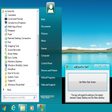








最新更新
OBS Studio
ビデオ録画およびライブ ストリーミング ソフトウェア
Google Earth Pro
無料の高度な3Dグローバル画像
Arduino IDE
Arduino用の無料ソフトウェア
TeamViewer
リモートデスクトップアプリケーション
Bluefish
ブルーフィッシュのレビュー
ChromeDriver
Windows用の無料プログラム、Googleによるものです。
TurboWarp
TurboWarp: 強化されたScratchパフォーマンス
VSO Downloader
VSOダウンローダー:標準的なビデオダウンロードツール
Rpcs3
無料ゲームエミュレータ
R
強力な統計プログラミング:Rソフトウェアレビュー
Visual Studio Code
強力で無料のコードエディター:Visual Studio Codeのレビュー
Laragon
leokhoaによるWindows用の無料アプリ。











最新バージョン
Start Menu 8 5.3.0.1
古いバージョン
Start Menu 8 5.2.0.9
Start Menu 8 4.6.0.1
Start Menu 8 4.4.0.1
Start Menu 8 4.3.0.1
Start Menu 8 4.2.0.2
Start Menu 8 4.2.0.1
Start Menu 8 4.1.0.4
Start Menu 8 4.0.2
Start Menu 8 4.0.1
Desktopで人気の
AOMEI Backupper
Google Earth Pro
OBS Studio
InSSIDer
Tera Term
HxD Hex Editor
PrimeOS
Adobe Air
Macrium Reflect
PostgreSQL