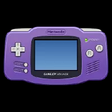
iDeaS Windows向けのアプリ
- iDeaS Emulator による
- 無料
- 1.0.2.8

技術仕様
- タイトル
- Windows用のiDeaS 1.0.2.8
- 必要条件
- Windows 98 SE
- Windows ME
- Windows XP
- Windows 98
- Windows 2000
- 言語
- 利用可能な言語
- 英語
- ライセンス
- 無料
- 最新の更新
- 著者
- iDeaS Emulator
- SHA-1
53fc2770c7880364f53fb8ee46b6d816a22f997b
- ファイル名
- ideas1028.7z
他の言語で利用可能なプログラム
iDeaS Windows向けのアプリ
- iDeaS Emulator による
- 無料
- 1.0.2.8
変更ログ
iDeaSのバージョン1.0.2.8に関する変更ログ情報はまだありません。出版社がこの情報を公開するのに時間がかかる場合がありますので、数日後にもう一度チェックして更新されたかどうかを確認した後、
アンケートにお答えいただけますか?
変更ログ情報に変更があった場合には、お客様からの連絡をお待ちしております!次に進みます。お問い合わせページ 当社にご連絡ください。
アプリを探索
Gaming Keyboard Splitter

Steam Achievement Manager

Razer Controller Setup For Xbox

Pixel Cross Stitch - Mythical Monsters Pack

Big Buck Hunter: Ultimate Trophy – Mythic Hunting Pack

Pixel Cross Stitch - Alien Worlds Pack 3

Pixel Cross Stitch - Mythical Monsters Pack 2

TEKKEN 8 - Clive Rosfield (FINAL FANTASY XVI)

LaunchBox

MameUI
関連ソフトウェア

Software Ideas Modeler
ソフトウェアアイデアモデルの包括的レビュー

Bold Ideas 2 My Desktop
3Dの創造性でデスクトップを変身させよう

EaseUS Partition Master Free
Partition Magicの代替として、EASEUS Partition Master Home Editionは無料のオールインワンパーティションソリューションおよびディスク管理ユーティリティです。パーティションの拡張(特にシステムドライブ用)、ディスク領域の管理、MBRおよびGUIDパーティションテーブル(GPT)ディスクのディスク領域不足の問題の解決を可能にします。 パーティションのサイズ変更/移動システムドライブを拡張するディスクとパーティションをコピーパーティションをマージ分割パーティション空き領域を再分配するダイナミックディスクの変換パーティションを回復する

Webi
Webiでウェブ自動化を効率化する

Audacity
Audacity is a free, easy-to-use audio editor and recorder for Windows, Mac OS X, GNU/Linux and other operating systems. You can use Audacity to: Record live audio. Convert tapes and records into digital recordings or CDs. Edit Ogg Vorbis, MP3, WAV or AIFF sound files. Cut, copy, splice or mix sounds together. Change the speed or pitch of a recording. Add new effects with LADSPA plug-ins. And more!

PCSX2
PCSX2は、PC用のPlaystation 2エミュレーターです。エミュレータの互換性率は、プレイ可能なすべてのPS2ゲームの80%以上を誇っています。かなり強力なコンピューターを所有している場合、PCSX2は優れたエミュレーターです。また、このアプリケーションはローエンドコンピューターのサポートも提供するため、Playstation 2コンソールのすべての所有者は、PCで動作するゲームを見ることができます。 PCSX2エミュレーターを使用すると、PS2コントローラーを使用して、本物のプレイステーション体験をシミュレートできます。このアプリケーションでは、ディスクからゲームを直接実行することも、ハードドライブからISOイメージとして実行することもできます。 主な機能は次のとおりです。 Savestates:ボタンを1つ押すだけで、ゲームの現在の「状態」を保存できます。 無制限のメモリーカード:好きなだけメモリーカードを保存でき、8MBから64MBまでの単一の物理カードに制限されなくなりました。 高解像度グラフィックス:PCSX2を使用すると、1080pまたは4K HDでゲームをプレイできます。 全体として、PCSX2 PS2エミュレーターの機能は優れています。 PS2ゲームを高い精度でエミュレートでき、Windowsとエミュレーターを切り替えることができます。欠点は、高速ゲームに苦労し、時々フリーズまたはクラッシュすることです。* PCSX2を使用するには、コンソールから抽出できるPlaystation 2 BIOSが必要です。

Rufus
Rufusは小さなユーティリティで、USBキーやペンドライブ、メモリスティックなどの起動可能なUSBフラッシュドライブをフォーマットおよび作成できます。 Rufusは、次のシナリオで役立ちます。 Windows、Linux、およびUEFI用の起動可能なISOからUSBインストールメディアを作成する必要がある場合。 OSがインストールされていないシステムで作業する必要がある場合。 BIOSまたはその他のファームウェアをDOSからフラッシュする必要がある場合。 低レベルのユーティリティを実行する必要がある場合。 Rufusは次の* ISOで動作します:Arch Linux、Archbang、BartPE / pebuilder、CentOS、Damn Small Linux、Fedora、FreeDOS、Gentoo、gNewSense、Hiren's Boot CD、LiveXP、Knoppix、Kubuntu、Linux Mint、NT Password Registry Editor、 OpenSUSE、Parted Magic、Slackware、Tails、Trinity Rescue Kit、Ubuntu、Ultimate Boot CD、Windows XP(SP2以降)、Windows Server 2003 R2、Windows Vista、Windows 7、Windows 8。 *このリストは完全ではありません。 サポートされている言語は次のとおりです。インドネシア語、マレーシア語、セシュティナ、ダンスク、ドイツ語、英語、スペイン語、フランス語、フルバツキー、イタリア語、ラトヴィエシュ、リエトゥビウ、マジャール、オランダ、ノルスク、ポルスキ、ポルトガル、ポルトガル、スロヴェンスキー、スロベンツキー、スロヴェンスキーSrpski、Suomi、Svenska、Türkçe。

EdrawMax
Edraw Max Professional is a useful flowchart design app that allows you to visualise your ideas. With Edraw Max Professional, users, such as students, teachers, and business professionals, are able to reliably create and publish various kinds of diagrams to represent any idea. The app provides a versatile, easy, quick and professional solution to working with diagrams. With rich forms, templates, enhanced effects and themes, Edraw Max Professional allows you to create intuitive diagrams for your every need. The scope of design is vast; you can create a house or floor plan, an evacuation plan, a wiring plan, a CVC plan, computer graphics, Gantt charts, decision trees, a UML diagram, business cards, flyers, certificates, invoices, a purchase order scheme, and much more. Key features include: All-in-one diagram software. Create flow charts. Free templates. Extensive symbols, icons and shapes. Edit and customise symbols. Fast and intuitive editing. Built-in cloud storage. Over 50,000 built-in vector graphics. Because Edraw Max Professional is based on cloud storage, you can access your work on any device, at any time, wherever you are. It also provides a range of collaboration tools that allow you and your team to edit files simultaneously. You can even share your designs with others via HTML links. With rich forms, templates, enhanced effects and themes, you can create fresh looking, polished diagrams that really stand out. Edraw Max Professional makes your diagrams more dynamic by linking real-time graphics to your data. With pre-drawn libraries and more than 50,000 vector symbols, creating diagrams couldn't be simpler. Overall, Edraw Max Professional is a great piece of all-in-one diagram software. It gives you all the tools you need to create detailed diagrams. It integrates well with office apps and has some powerful functions. The interface is intuitive and easy to get to grips with. This version of Edraw Max Professional is a 30-day trial. Find Edraw Max Professional for Mac here.

CorelCAD 2019 64-bit
CorelCAD brings industry-standard CAD features, precise 2D drafting and 3D design tools, and advanced .DWG file support at an affordable price*. The app allows you to open, edit and share files in .DWG format for easy collaboration. You can communicate your ideas with precision using customizable 2D drafting and 3D design tools and you can experience immediate productivity in an environment filled with industry-standard features such as the Ribbon UI and enhanced layer tools. KEY FEATURES INCLUDE High-performance CAD engine. Industry-standard tools. Precise and comprehensive 2D drafting and 3D design tools. Advanced .DWG file and CorelDRAW graphics support Access and re-purpose your design assets from within the new Design Resources Flexible options to customize and automate for PC. CorelCAD has some cool new features over the previous version, including new drawing tabs that allow your workflow to stay more organized by including the ability to open connecting folders from within the current drawing windows. There are also enhancements to 2D editing tools, and an enhanced, customizable Windows ribbon. This new Windows ribbon provides you with a way to improve your productivity by selecting and implementing the various design tools that CorelCAD has to offer. Some new features of CorelCAD 2016 worth mentioning are the new Head-Up Display toolbar, and the new Quick Input tools. By using the new toolbar you can select various entities and then zoom in on them to make required changes. With the ability to edit your entities in one place, you can set the line style and line width, change layers, create dimension entities or make a Block. With the new Quick Input tools you can establish a command interface directly in your project by using the cursor in the drawing area. This is an efficient and time-saving feature. When you move the cursor, the tool-tips can track and enable you to input coordinate positions, lengths, angles, and lines where you need them to be. Overall, CorelCAD is an industry standard application that has an impressive array of features, it is compatible with all major CAD apps, and it uses a smart and intuitive interface. *This is a 30 day trial, with some reduced functions.

VLC Media Player 32-bit
VLC Media Playerは、最も人気があり堅牢なマルチフォーマットの無料メディアプレーヤーです。 VLC Media Playerは、非営利団体VideoLAN Projectによって2001年に公開されました。 VLC Media Playerは、その多彩なマルチフォーマット再生機能のおかげで、すぐに非常に人気がありました。 QuickTime、Windows、Real Media Playerなどの競合メディアプレーヤーが多くの一般的なビデオおよび音楽ファイル形式に役に立たないようにする互換性とコーデックの問題によって支援されました。簡単で基本的なUIと多数のカスタマイズオプションにより、VLC Media Playerは無料のメディアプレーヤーのトップに位置付けられています。 柔軟性 VLC Media Playerは、検索可能なほぼすべてのビデオまたは音楽ファイル形式を再生します。これは、ほとんどの人がメディアファイルを再生しようとするとクラッシュしたり、「コーデックが見つかりません」というエラーメッセージを表示したりしていたデフォルトのメディアプレーヤーと比較して革命でした。 VLC Media Playerは、MPEG、AVI、RMBV、FLV、QuickTime、WMV、MP4およびその他のビデオおよびオーディオメディアファイル形式の負荷を再生できます。 VLC Media Playerはさまざまな形式のロードを処理できるだけでなく、部分的または不完全なオーディオおよびビデオメディアファイルを再生できるため、ダウンロードを終了前にプレビューできます。 使いやすい VLC Media PlayerのUIは、間違いなく機能よりも美の機能です。ただし、基本的な外観により、メディアプレーヤーは非常に使いやすくなります。ファイルやフォルダーを使用してファイルをドラッグアンドドロップして再生または開くだけで、クラシックメディアナビゲーションボタンを使用して、再生、一時停止、停止、スキップ、再生速度の編集、音量、明るさの変更などを行うことができます。つまり、標準の外観だけではVLCをデフォルトのメディアプレーヤーとして選択できなくなるわけではありません。 高度なオプション VLC Media Playerのシンプルなインターフェイスに惑わされないでください。再生、オーディオ、ビデオ、ツール、およびビューのタブには、さまざまなプレーヤーオプションがあります。複数のプリセット、オーバーレイ、特殊効果、AtmoLightビデオ効果、オーディオ空間化、カスタマイズ可能な範囲圧縮設定を備えたグラフィックイコライザーなどの同期設定で再生できます。 SRTファイルをビデオのフォルダーに追加することで、ビデオに字幕を追加することもできます。 概要 VLC Media Playerは、非常にシンプルで汎用性が高く、安定した高品質の無料メディアプレーヤーです。 10年以上にわたって無料のメディアプレーヤー市場を独占してきましたが、VideoLAN Orgによる絶え間ない開発と改善のおかげで、さらに10年間はそうなるようです。 MacバージョンのVLC Media Playerをお探しですか?ここからダウンロード

CorelCAD 2019 32-bit
CorelCAD brings industry-standard CAD features, precise 2D drafting and 3D design tools, and advanced .DWG file support at an affordable price*. The app allows you to open, edit and share files in .DWG format for easy collaboration. You can communicate your ideas with precision using customizable 2D drafting and 3D design tools and you can experience immediate productivity in an environment filled with industry-standard features such as the Ribbon UI and enhanced layer tools. KEY FEATURES INCLUDE High-performance CAD engine. Industry-standard tools. Precise and comprehensive 2D drafting and 3D design tools. Advanced .DWG file and CorelDRAW graphics support Access and re-purpose your design assets from within the new Design Resources Flexible options to customize and automate for PC. CorelCAD has some cool new features over the previous version, including new drawing tabs that allow your workflow to stay more organized by including the ability to open connecting folders from within the current drawing windows. There are also enhancements to 2D editing tools, and an enhanced, customizable Windows ribbon. This new Windows ribbon provides you with a way to improve your productivity by selecting and implementing the various design tools that CorelCAD has to offer. Some new features of CorelCAD worth mentioning are the new Head-Up Display toolbar, and the new Quick Input tools. By using the new toolbar you can select various entities and then zoom in on them to make required changes. With the ability to edit your entities in one place, you can set the line style and line width, change layers, create dimension entities or make a Block. With the new Quick Input tools you can establish a command interface directly in your project by using the cursor in the drawing area. This is an efficient and time-saving feature. When you move the cursor, the tool-tips can track and enable you to input coordinate positions, lengths, angles, and lines where you need them to be. Overall, CorelCAD is an industry standard application that has an impressive array of features, it is compatible with all major CAD apps, and it uses a smart and intuitive interface. *This is a 30 day trial, with some reduced functions.

Maxthon Cloud Browser
Maxthon Cloud Browserは、高度にカスタマイズ可能なインターフェースを備えた強力なWebブラウザーです。ブラウザには、リソーススニファー、スクリーンキャプチャツール、ナイトモード、クラウド機能など、Webエクスペリエンスをより楽しくする複数のツールがあります。 主な機能は次のとおりです 目立たないUI:ブラウザのツールバー、アイコン、メニュー、色、スキン、レイアウトを追加、移動、交換、変更することにより、Maxthon Cloud Browserを完全にカスタマイズできます。 組み込みの広告ハンター:このツールは、有害な広告、画像、ページをブロックします。フィルターパックは、不快なWebページも除外します。 プラグイン:現在、Maxthon Cloud Browserでは1,400以上のプラグインが利用可能です。 クラウド同期とクラウドプッシュ:Maxthon Cloud Browserには、アプリを実行しているすべてのコンピューターとモバイルデバイス全体で、ブックマーク、タブ、オプション、アドレスバー、新しいタブリンクを同期する機能があります。
最新更新

Xbox Game Bar
無料の Microsoft ゲーム オーバーレイ

Vita3K
Vita3K: 決定版 PS Vita エミュレーター

ReWASD
ReWASDでゲームを最適化する

Prism Launcher
プリズムランチャー: あなたのマインクラフト体験を向上させる

PURPLE
PURPLEエミュレーターの包括的レビュー

WowUp
WowUp:World of Warcraftプレイヤーのための必須アドオン管理

FixBuff
FixBuffでゲーム体験を最適化する

TweakMB
TweakMB Modでゲームプレイを向上させる

EA Desktop App
ゲーム ライブラリ、ストア、ランチャー

PC Optimizer and FPS Booster
PCオプティマイザーでゲームパフォーマンスを向上させる

Suyu
Suyu: Windowsユーザーのための効率的なユーティリティツール

CCleaner Free
掃除と最適化が簡単に